Hello, I’m Thomas.
In game audio development, reading code is an unavoidable task. Once a codebase reaches a certain scale, regardless of code quality, this process often becomes a time-consuming and laborious “archaeological excavation”—have you ever found yourself jumping between dozens of files, only to get lost in the code maze?
Recently, I introduced AI into my code comprehension workflow and discovered it acts like a tireless “senior architect,” capable of quickly mapping code structures and explaining complex logic.
This article uses “how to efficiently read codebases” as an entry point to share my practical approach, hoping to help you move beyond “archaeological” code exploration and dedicate time to more important architectural design and logic implementation.
Terminology
The following terms will be used throughout this article:
- RAG: Retrieval-Augmented Generation
- LLM: Large Language Model
- Vibe Coding: A development approach where AI autonomously generates code based on natural language prompts describing requirements
- Spec-Driven Coding: A specification-driven AI software development methodology that ensures controllable AI behavior through structured specification documents
Reflection
The Dilemma of Code Reading
Game audio development work can be divided into two parts:
- Offline tools: Mostly in-house frameworks or built from scratch, with relatively minor code reading challenges
- Audio features: Requires understanding Wwise engine integration and game client code details to determine audio system integration points
For the latter, implementing a feature typically requires multiple iterations of the “communicate => query => attempt” cycle to locate the necessary code and implement the logic.
Limitations of Traditional Methods
From an engineering perspective, this can be abstracted as:
- Problem: The feature to be implemented
- Answer: Which APIs or algorithms to use, where to add or modify code, and ensuring no side effects
To find answers, traditional approaches involve reading documentation or source code to gradually unravel the logic, but this method has several limitations:
- Documentation-code disconnect: Projects often have outdated or missing documentation, and the same applies to comments. Not only does this fail to aid understanding, it can even become a distraction
- Missing context: While
Go to Definitionin IDEs is convenient, it easily traps you in details. After too many jumps, you lose context—seeing the trees but missing the forest - Complex dependencies: In large projects, a simple
Init()method may hide complex singleton initialization, event binding, and resource loading. Human “mental stack” alone struggles to track everything - Flow disruption: To understand a single module, you must jump between dozens of files, forcing your brain to context-switch between different logic fragments, easily destroying flow state
These issues affect every game audio developer. Inspired by NotebookLM’s motto “Think Smarter, Not Harder,” I have been exploring systematic solutions to this problem. The AI era offers new approaches to address these challenges.
Approaches in the AI Era
The Vibe Coding Approach
Shortly after the Vibe Coding concept emerged, I began exploring it. Through practice, I found Vibe Coding performs reasonably well on small to medium projects—even when results fall short of expectations, code quality can be tuned through multiple prompt iterations.
However, when facing enterprise-level game projects, several issues arise:
- Limited visibility: AI can only see code in its context. Even with RAG and other context compression methods, it can only make decisions based on observed code. It also tends to “forget” business boundaries and make mistakes in details
- Difficult verification: Game project code logic is highly complex, often making unit testing at the code level impractical. AI struggles to self-verify results, making Vibe Coding outcomes difficult to control
- Lack of specifications: There’s no unified protocol between humans, AI, and tools, and background information like development standards and interface definitions in the project is inaccessible
Vibe Coding’s limitations reveal that simply relying on AI’s “free improvisation” isn’t enough—AI needs constraints.
The Spec-Driven Coding Approach
Spec-Driven Coding is an engineering approach to AI programming. Its principles are:
- Prompts are saved as hierarchical, templated, constrained structured documents, ensuring AI can master requirements as “external knowledge” at any time
- Context is dynamically injected through tools, interfaces, and databases
- Workflows are reusable, orchestrable, and monitorable
Even for large projects, it can achieve good results.
However, issues still remain:
- This development approach requires providing structured documentation so AI can understand various background knowledge
- If developers have limited understanding of the codebase, they naturally cannot provide effective specification documents, forcing AI to continue free exploration and becoming uncontrollable again
This validates an important principle: AI is a cognitive amplifier. Without sufficient codebase understanding, AI cannot work miracles with just a few prompts. Fortunately, there is another approach.
The DeepWiki Solution
DeepWiki is a code comprehension tool with underlying principles similar to Google NotebookLM, also based on RAG (for a brief introduction to RAG, see my previous post “Building an Efficient Game Audio Q&A Knowledge Base”). Its core logic is Codebase Awareness, with main features including:
- Full repository indexing: Like an IDE, it first scans the entire repo, building an Abstract Syntax Tree (AST) and reference relationship graph
- Semantic understanding: Understands code semantics and knows relationships between code modules, rather than just text matching
- Source Grounding: Generated explanations provide source links, allowing you to trace back to referenced code at any time, ensuring every explanation is verifiable
It’s like having a 24/7 online “original author” for your codebase who remembers the ins and outs of all logic, available on demand. Beyond understanding code details, DeepWiki can also provide architectural perspectives at any time, giving us the ability to examine code freely between micro and macro levels for the first time. Based on code architecture knowledge gained from DeepWiki, you can also refine Spec-Driven Coding specification documents, creating a positive feedback loop for AI tools in development.
Use Cases
Below are three real-world scenarios demonstrating how DeepWiki assists in understanding complex code logic.
Case 1: How AkSpatialAudioVolume Passes Physical Information to SoundEngine
Wwise’s UE integration provides the AkSpatialAudioVolume component for passing scene physical information to SoundEngine.
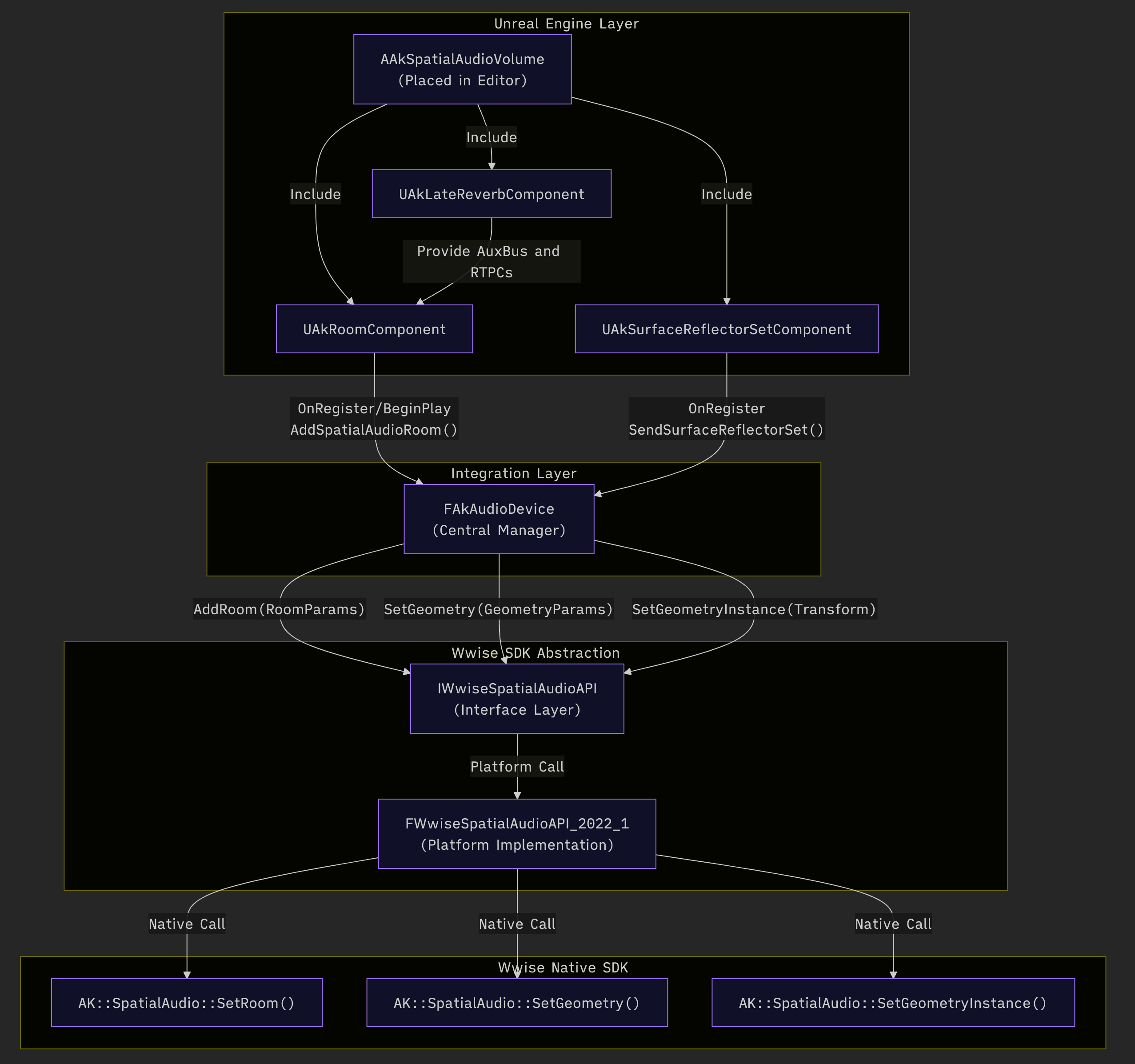
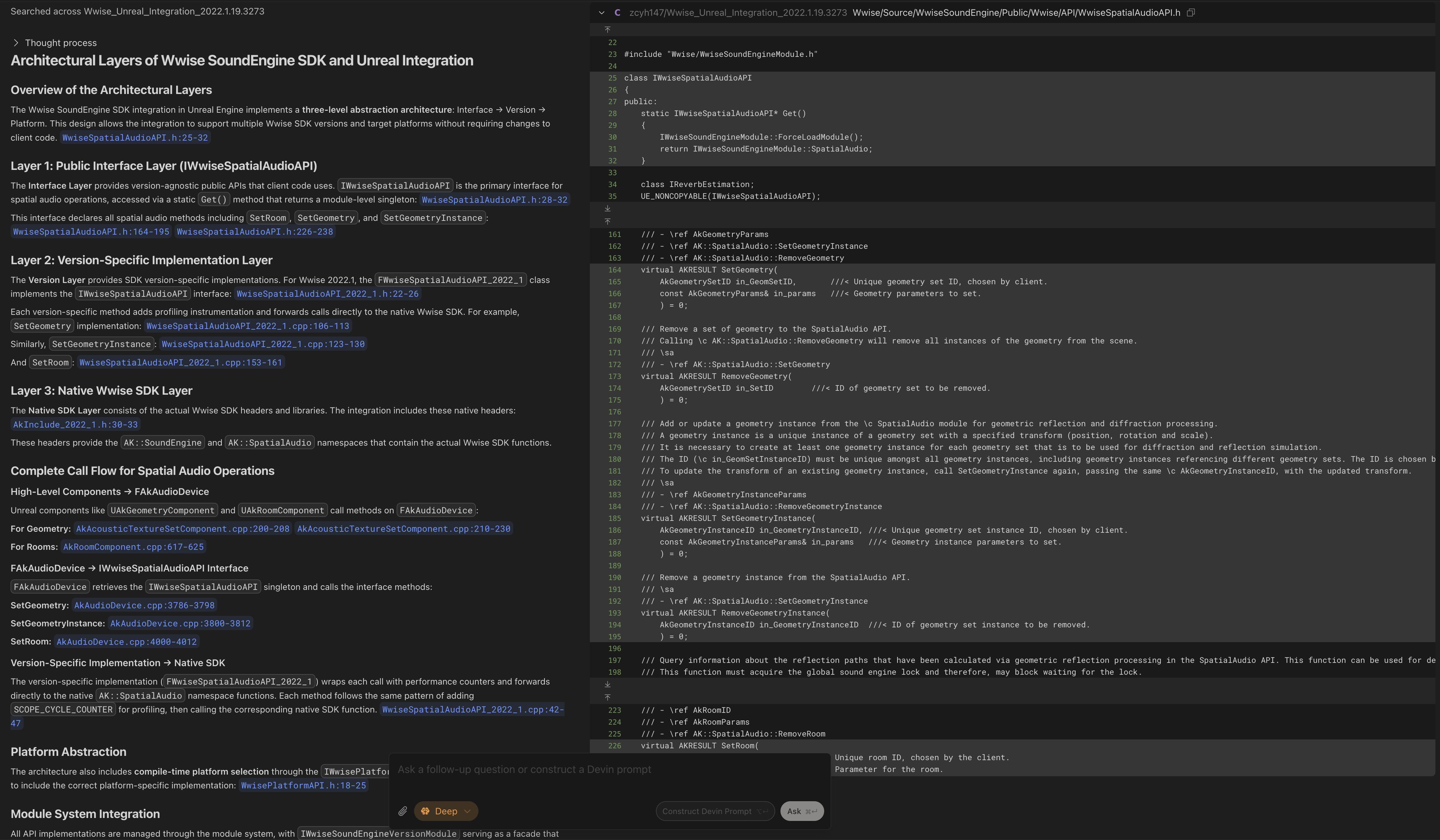
Question: In the Wwise spatial audio system, AkSpatialAudioVolume is a critical component for Wwise’s interaction with UE’s physical world. For an AkSpatialAudioVolume already placed in the Editor, what logic executes on it at game runtime, and what happens throughout the entire process of passing data to the underlying Wwise SoundEngine SDK?
Result:
- DeepWiki detailed the complete process from
AkSpatialAudioVolume’s three subcomponents through a series of steps, ultimately reaching the underlyingAK::SpatialAudioAPI - The AI-generated flowchart clearly shows the entire call chain::
Case 2: The Complete Workflow of Creating Wwise Assets as UAssets
Wwise Unreal Integration automatically generates UAssets. I wanted to understand the complete process behind asset creation.
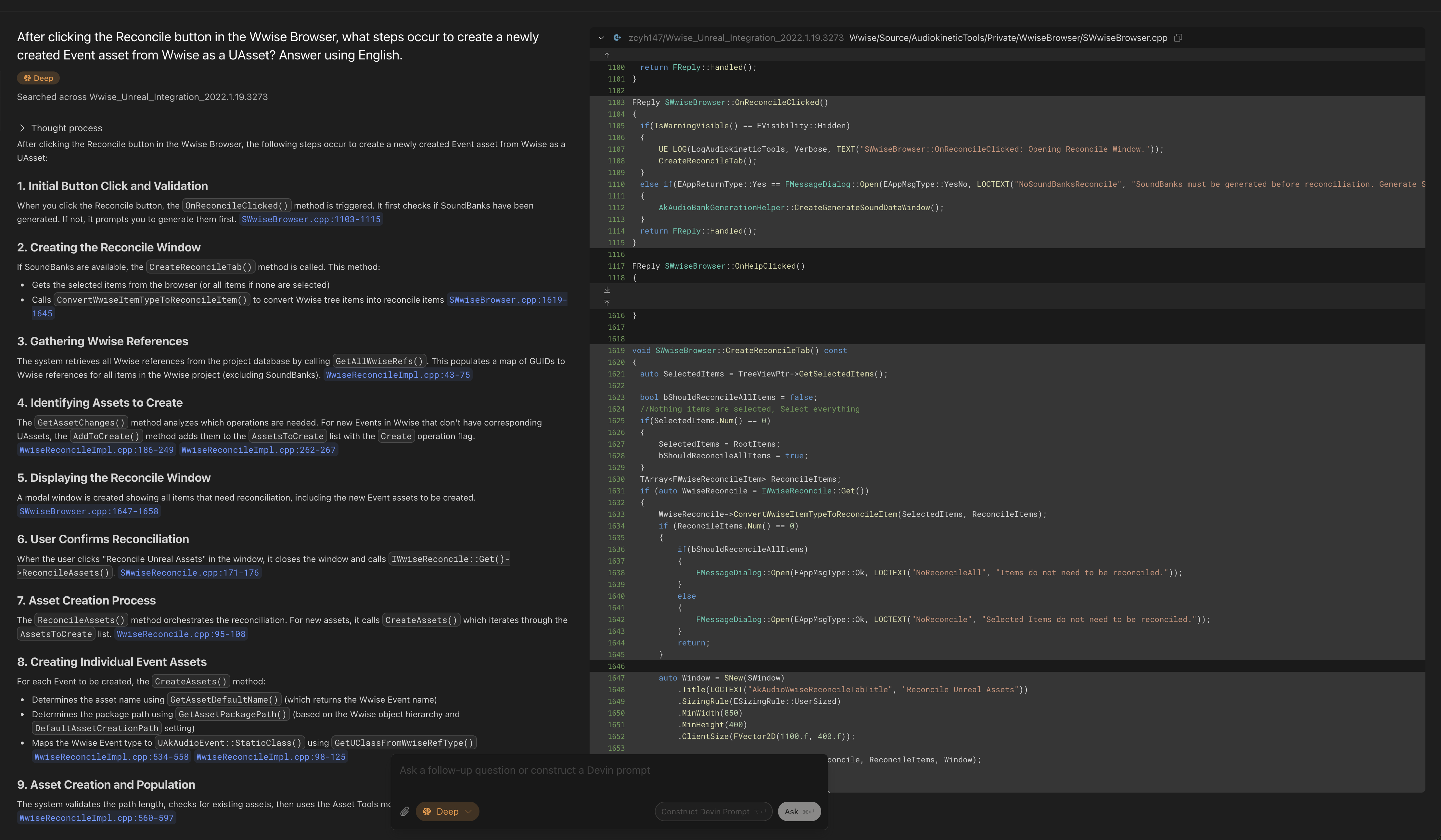
Question: After clicking the Reconcile button in the Wwise Browser, what steps occur to create a newly created Event asset from Wwise as a UAsset?
Result:
DeepWiki traced the entire workflow from the button press in Wwise Browser all the way to UEditorLoadingAndSavingUtils::SavePackages, the underlying UE asset saving interface, providing a complete view of the process:
1. Initial Button Click and Validation
When you click the Reconcile button, the OnReconcileClicked() method is triggered. It first checks if SoundBanks have been generated. If not, it prompts you to generate them first. SWwiseBrowser.cpp:1103-1115

2. Creating the Reconcile Window
If SoundBanks are available, the CreateReconcileTab() method is called. This method:

Gets the selected items from the browser (or all items if none are selected)
Calls ConvertWwiseItemTypeToReconcileItem() to convert Wwise tree items into reconcile items SWwiseBrowser.cpp:1619-1645
3. Gathering Wwise References
The system retrieves all Wwise references from the project database by calling GetAllWwiseRefs(). This populates a map of GUIDs to Wwise references for all items in the Wwise project (excluding SoundBanks). WwiseReconcileImpl.cpp:43-75

4. Identifying Assets to Create
The GetAssetChanges() method analyzes which operations are needed. For new Events in Wwise that don't have corresponding UAssets, the AddToCreate() method adds them to the AssetsToCreate list with the Create operation flag. WwiseReconcileImpl.cpp:186-249 WwiseReconcileImpl.cpp:262-267

5. Displaying the Reconcile Window
A modal window is created showing all items that need reconciliation, including the new Event assets to be created. SWwiseBrowser.cpp:1647-1658

6. User Confirms Reconciliation
When the user clicks "Reconcile Unreal Assets" in the window, it closes the window and calls IWwiseReconcile::Get()->ReconcileAssets(). SWwiseReconcile.cpp:171-176

7. Asset Creation Process
The ReconcileAssets() method orchestrates the reconciliation. For new assets, it calls CreateAssets() which iterates through the AssetsToCreate list. WwiseReconcile.cpp:95-108

8. Creating Individual Event Assets
For each Event to be created, the CreateAssets() method:

Determines the asset name using GetAssetDefaultName() (which returns the Wwise Event name)
Determines the package path using GetAssetPackagePath() (based on the Wwise object hierarchy and DefaultAssetCreationPath setting)
Maps the Wwise Event type to UAkAudioEvent::StaticClass() using GetUClassFromWwiseRefType() WwiseReconcileImpl.cpp:534-558 WwiseReconcileImpl.cpp:98-125
9. Asset Creation and Population
The system validates the path length, checks for existing assets, then uses the Asset Tools module to create the asset: WwiseReconcileImpl.cpp:560-597

10. Filling Asset Metadata
After creating the asset, FillInfo() is called to populate it with the Wwise reference data (GUID, Short ID, and Name): WwiseReconcileImpl.cpp:599-600

This method sets the Event's metadata from the Wwise reference: AkAudioType.cpp:303-310

11. Saving the Assets
Finally, all created assets are saved to disk using Unreal's package saving system: WwiseReconcileImpl.cpp:610-616

Notes
The reconciliation process uses the Wwise Project Database to get metadata about Events and other Wwise objects.
Asset paths are determined by combining the DefaultAssetCreationPath setting from AkSettings with the Wwise object's hierarchy path.
For Events specifically, the asset name is simply the Wwise Event name (unlike States and Switches which include their group name).
The process includes validation for path length limits to ensure compatibility across platforms.
All operations are performed within a progress dialog that can be cancelled by the user.
Case 3: How post_event() is Called Through the MCP Protocol in Wwise-MCP
Wwise-MCP is an open-source Wwise MCP protocol project. I wanted to quickly understand how it implements post_event() from the MCP protocol down.
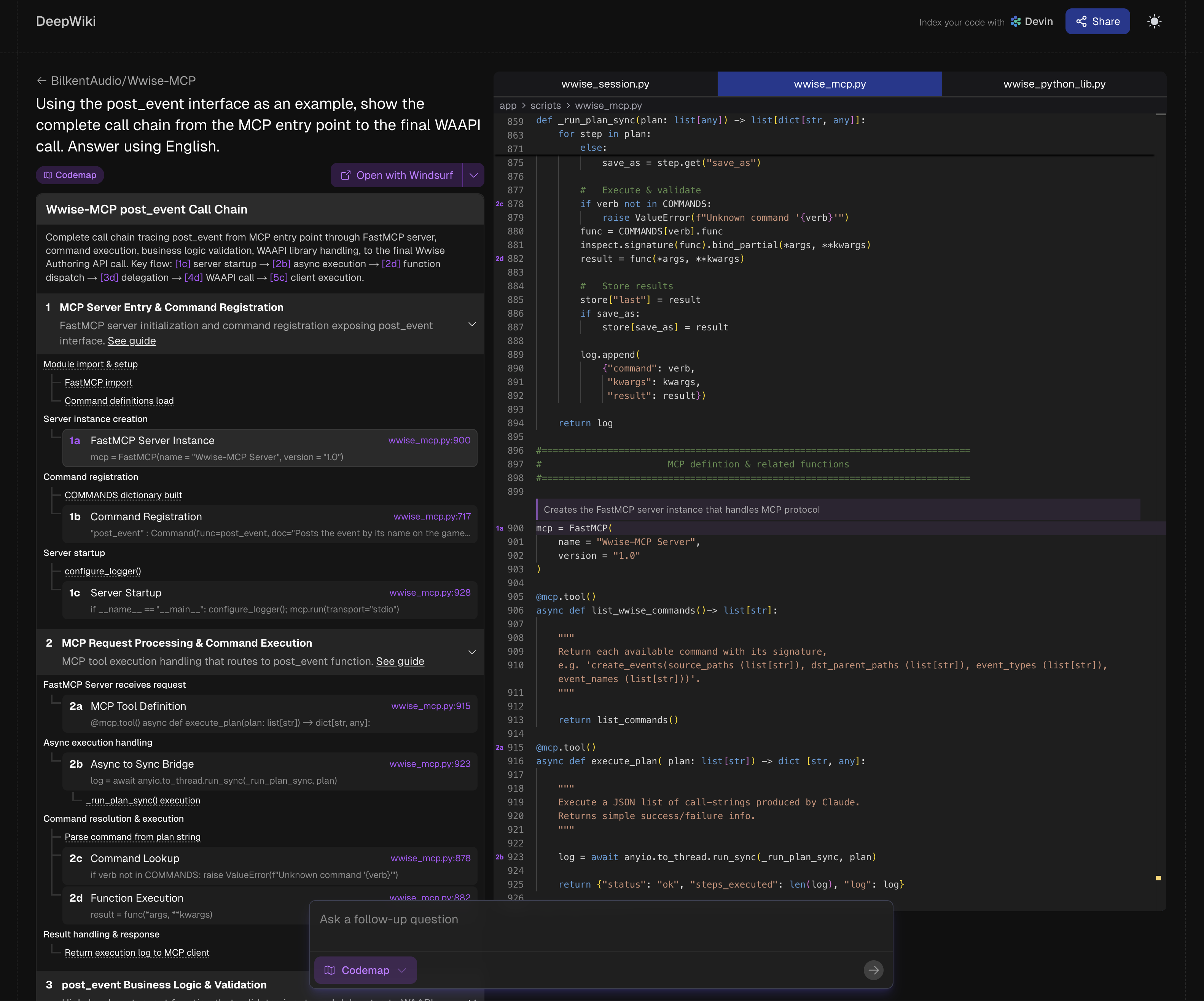
Question: Using the post_event interface as an example, show the complete call chain from the MCP entry point to the final WAAPI call.
Result:
DeepWiki clearly demonstrated this API’s workflow, divided into four macro-level steps: FastMCP framework receives request => calls post_event() interface in the class library => manages Game Object to ensure Post Event conditions are met => finally Posts Event.
This case showcases DeepWiki’s Codemap mode, which displays the top-down call chain in a tree structure with corresponding code anchors:
Building a Code Knowledge Base
Using DeepWiki is very simple, requiring only four steps:
- Open DeepWiki (https://deepwiki.com) and authorize connection to your GitHub account
- Click
Add repoon the homepage, select the repository to generate a knowledge base for. Both public and private repositories are supported (in Cases 1 and 2 above, I uploaded Wwise UE integration source code to a private repository as the knowledge base data source)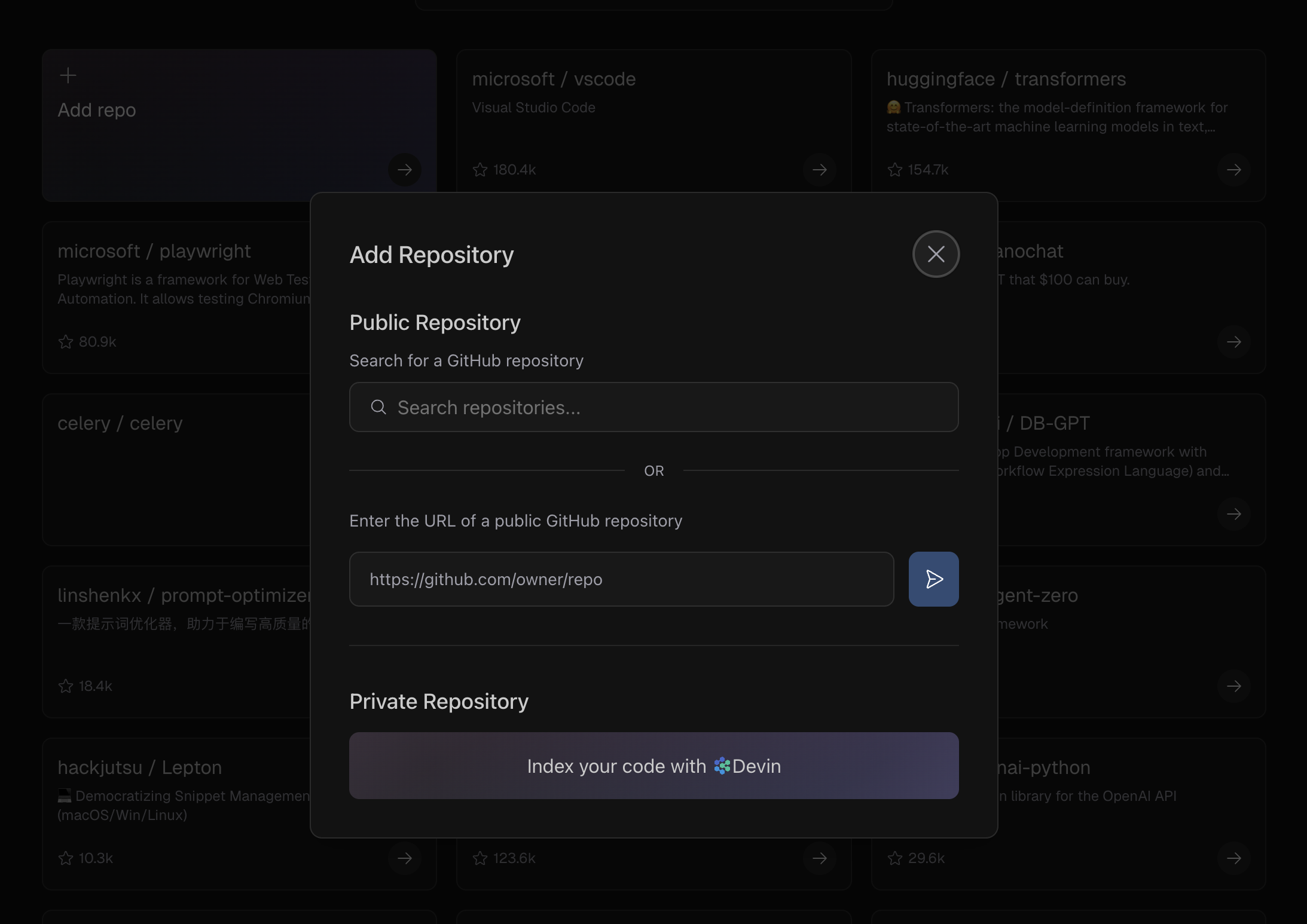
- The system will automatically pull code and build indexes, and will periodically update indexes after subsequent code updates
- Once indexing is complete, you can start conversations on the homepage
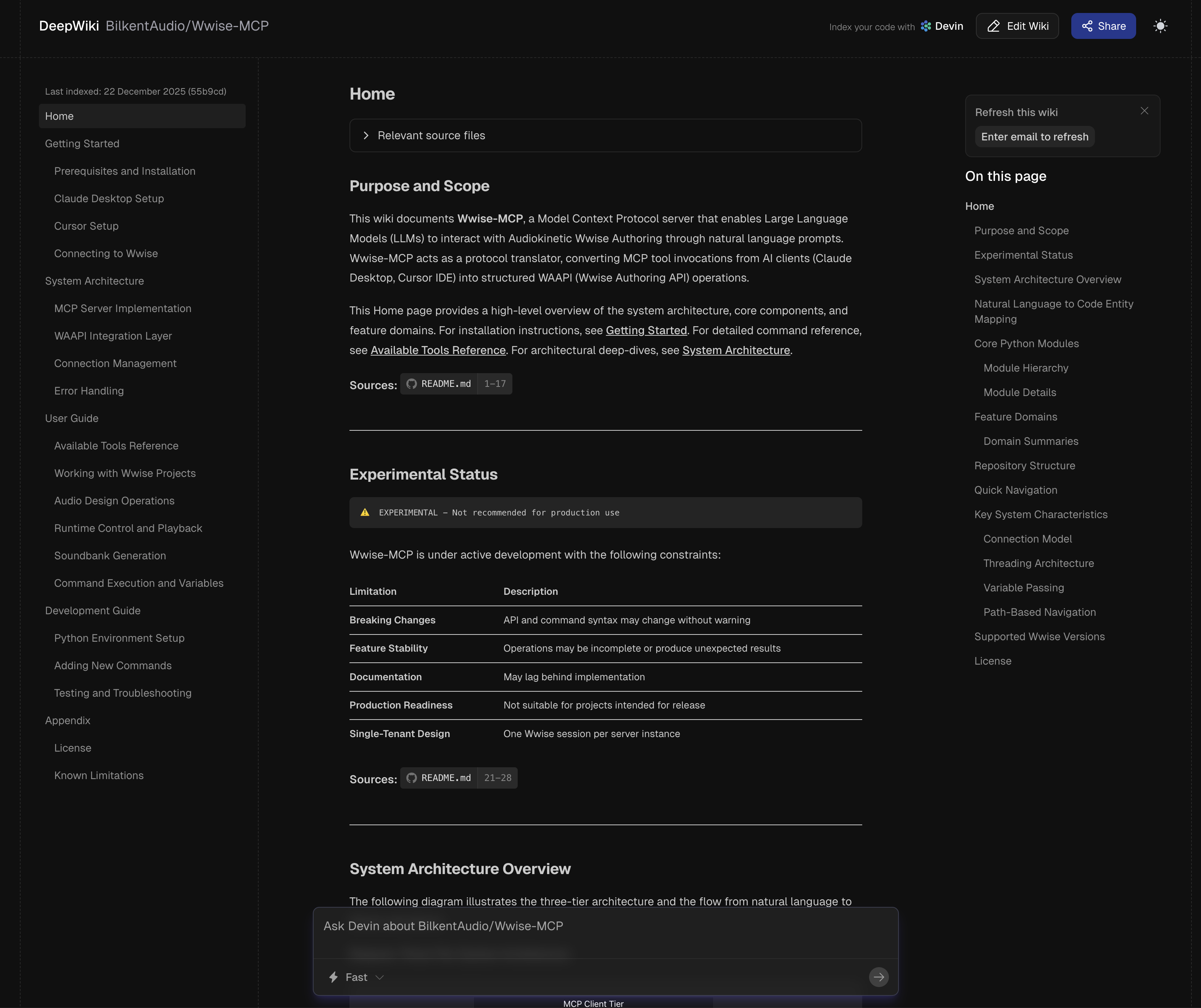
Additional Notes
Pros and Cons
Every product has pros and cons, and DeepWiki is no exception.
Pros:
- Free
- Strong code comprehension capabilities—even for codebases with tens of millions of lines like the Linux Kernel (https://github.com/torvalds/linux), it can still provide reliable answers
Cons:
- To be indexed, code must be stored on platforms like GitHub, public GitLab, or public Bitbucket, making it difficult to keep internal code confidential
- Only supports text-based code; cannot handle binary logic assets in game engines (such as UE Blueprints)
Customizing Code Knowledge Base
After creating .devin/wiki.json in the code repository, you can customize the scope, page structure, and page content of the code knowledge base.
For specific usage, refer to the official documentation: https://docs.devin.ai/work-with-devin/deepwiki
How to Build a Code Knowledge Base for Internal Codebases
Internal codebases cannot be passed to external platforms like DeepWiki to avoid leaks. Additionally, internal project code iterates frequently (often using private version control systems like Perforce or Subversion), making it extremely costly to maintain an external codebase as a retrieval data source. The following methods can serve as alternatives:
- Open-source private deployment: The open-source solution
deepwiki-open(https://github.com/AsyncFuncAI/deepwiki-open) implements functionality similar to DeepWiki. After deploying the project and connecting to a private LLM, you can achieve similar use cases with complete confidentiality - Commercial private deployment: Sourcegraph Cody is an AI IDE that provides functionality similar to DeepWiki and supports enterprise intranet deployment
- AI IDEs: For example, Windsurf has built-in DeepWiki and Codemap capabilities that can retrieve from any local codebase, though its DeepWiki functionality is relatively limited
Similar Products
Here are some similar products that can serve as alternatives to DeepWiki:
- Zread (free): A Chinese version of DeepWiki developed by Zhipu, based on the GLM model
- Qoder (paid): An AI IDE developed by Bright Zenith that provides Code Wiki functionality
Summary
This article introduced how to use DeepWiki, an AI tool, to efficiently understand complex codebases. Traditional code reading methods often involve high cognitive load and inefficient context switching, while DeepWiki solves this pain point through full repository indexing and semantic understanding:
- Macro level: It can act as an architect, organizing module relationships and business processes
- Micro level: It can act as a mentor, explaining obscure algorithms and potential side effects
- Collaboration level: It can act as an invisible documentation maintainer, preventing team knowledge from being lost due to personnel turnover
Tool evolution is meant to unleash human creativity. As technical audio designers, we shouldn’t be trapped in code mazes, but should focus on what truly matters—refining audio systems and creating better auditory experiences for players.